Features
- Open your ButterflyMX-equipped door from your Apple Watch
Prerequisites
- A ButterflyMX account is required
- An Apple Watch is required
- The ButterflyMX iOS mobile app is required
Context:
Residents love the ButterflyMX because it allows them to open the door with their smartphone.
But now, we’ve gone one step further – you can open the door using the ButterflyMX app on your Apple Watch. And – if your Apple Watch has cellular, you can even go for a jog and leave your phone behind. We go through the steps of how it works below.
How to open the door from an Apple Watch
- Add the ButterflyMX app to your Apple Watch
- Follow these steps to add the ButterflyMX app to your Apple Watch:
- Open the Apple Watch app on your iPhone
- Scroll down to where it says ‘Available Apps’
- Look for ButterflyMX and hit ‘Install’
- Wait for it to finish installing. When complete, it will appear in the ‘Installed on Apple Watch’ section
- Follow these steps to add the ButterflyMX app to your Apple Watch:
- Open the ButterflyMX app on your Apple Watch
-
Open the ButterflyMX app on the home screen of your Apple Watch (see ButterflyMX icon below).
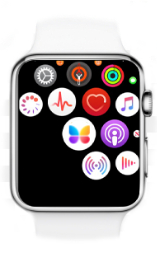
-
- Push “Tap to Unlock”
-
Push “Tap to Unlock”.
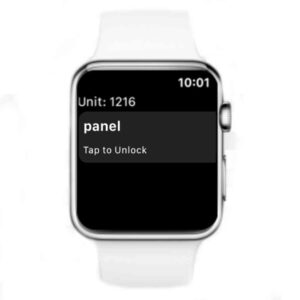
-
- Open the door or gate
-
Open the door/gate.
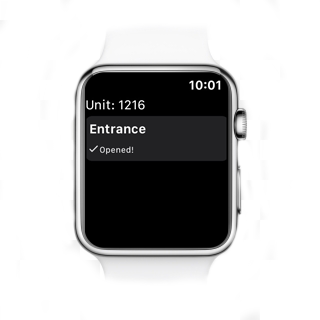
-
When the door has been successfully released, you will see “opened” with a checkmark as shown above. Once you see that message, the door/gate will be released for five seconds and you or your guest can enter the property.