Context:
A Door PIN is a convenient and secure backup method for accessing your building when your phone or keys aren’t available. With ButterflyMX, you can easily create, customize, and use a Door PIN.
Disclaimer: Door PINs are meant for resident/tenant use only. If you need to provide access to a visitor, please create a Visitor Pass for them instead. They offer you more control and can be issued to multiple people.
Prerequisites
- You must have a ButterflyMX account
- An iOS or Android device
How to use a Door PIN with ButterflyMX
- Locate your Door PIN in the ButterflyMX app
-
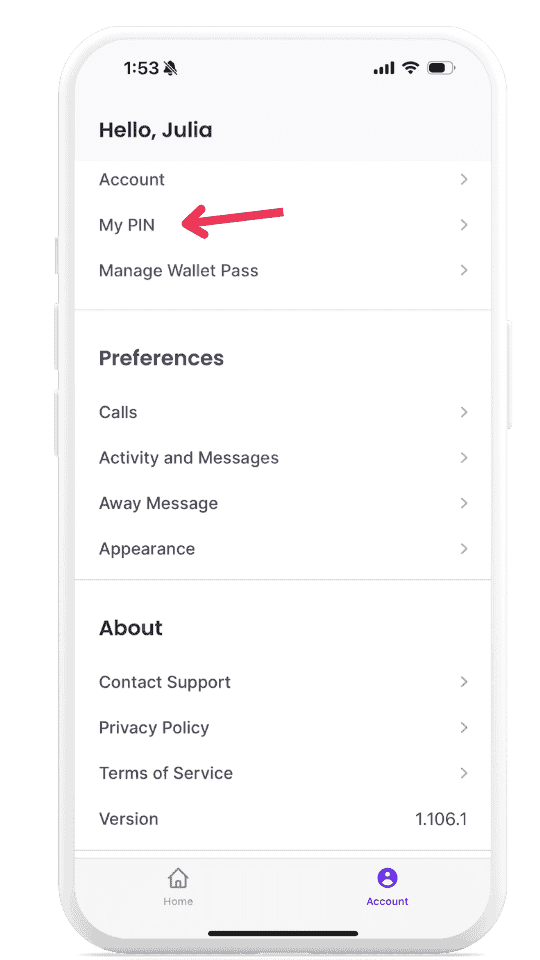
To locate your Door PIN, launch the ButterflyMX app on your smartphone. Tap ‘Account’ in the bottom right corner and select ‘My PIN’. Tap the eye icon to reveal your current PIN.
-
- Choose and customize your PIN
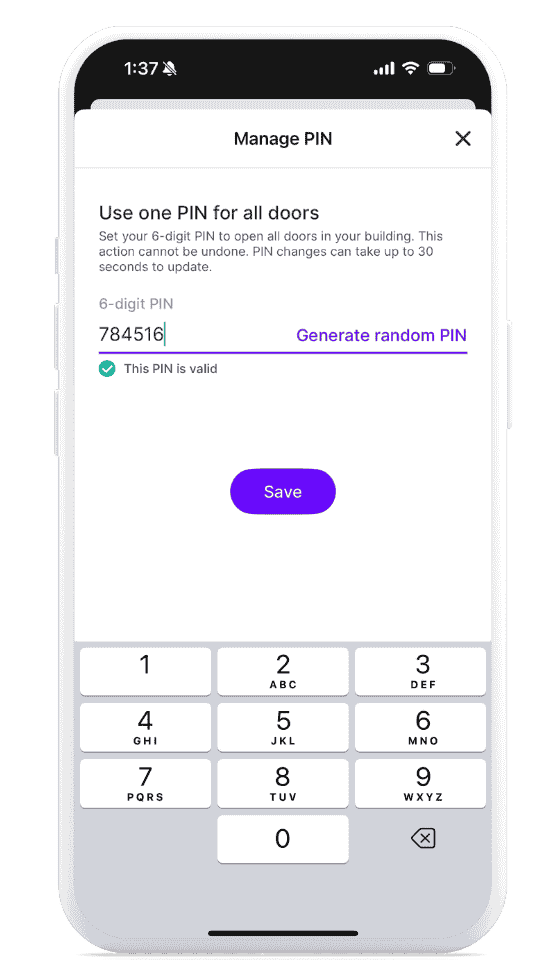
- Tap ‘Manage PIN’ to change your PIN.
-
You can either type in a custom 6-digit code or generate one randomly. Then, press save.
- Use your PIN at your ButterflyMX-enabled door
-
To use your PIN:
- On a Video Intercom: Tap the ‘Door PIN’ icon, then enter your PIN. Tap ‘Enter’. The intercom will chime and display a ‘Door Open’ message.
-
On a Keypad: Type in your 6-digit PIN followed by the # sign.
-
To use your PIN:
That’s it! You can now use a Door PIN anytime you need to gain access to your property.