Context:
When you have a visitor at your ButterflyMX-equipped building, there are a few ways they can gain access:
- They can look up your name in the directory and call you
- You can issue them a Visitor Pass which they would scan onto the intercom
In the ButterflyMX app, you can view a history of who has called you or messaged you through the Video Intercom. Follow the instructions below to learn how.
Features
- View a full history of your visitors and deliveries in the ButterflyMX mobile app
Prerequisites
- You must have a ButterflyMX account.
- You must have the ButterflyMX mobile app on iOS or Android
How to view your ButterflyMX visitor and delivery history:
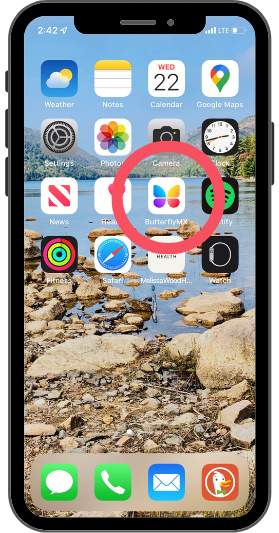
- Open the ButterflyMX app
-
Open the ButterflyMX app on your smartphone.
-
- Hit the notifications icon
-
Next, hit the notifications (bell) icon in the top right-hand corner of your screen.
-
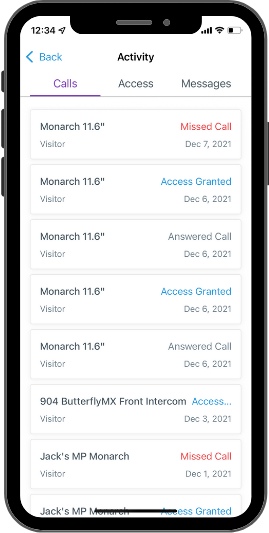
- View your call and door activity history
-
This is where you can see a full view of your call history.
-
Hit the ‘Access’ tab to see all of the instances in which you or a visitor/delivery accessed your building as well as how they gained access.
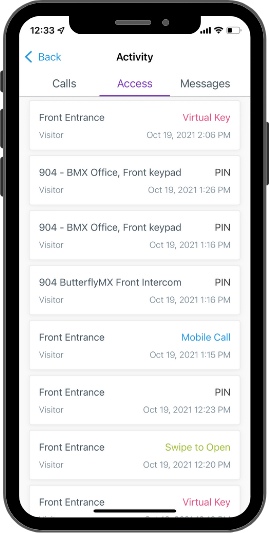
- If you click on any of the individual activity lines, you can see a time- and date-stamped photo of who accessed the building.
-